


In the contemporary, digitally driven world that is fast-moving, developers and companies are always on the lookout for powerful ways of creating, deploying, and scaling their applications. This is precisely where Azure Kubernetes Service steps in as a fully managed container orchestration platform created to make your management of Kubernetes on Azure easier. Regardless of whether you are utilising microservices, bringing legacy systems up to date, or doing cloud-native solutions testing, AKS can certainly give you the versatility and command over your operations.
What is attractive about AKS is mainly that it manages the K8S complexities almost entirely. Rather than dealing with issues around nodes, networking, and upgrading, you can concentrate on the primary thing: the delivery of applications faster and more reliably. Automatic scaling, monitoring, and Azure DevOps integration are some of the main features of AKS, which allow you to remain agile while keeping an eye on the operational costs at the same time.
As more and more companies are transitioningning, AKS is winning the hearts of many as the primary platform for the development of modern applications. Running containers is not the only thing; it is the usage of performance, the upgrade of security, and the support of operations across the different environments that have to be done. In this manual, we are ready to guide you through all AKS-related topics, right from its architecture to the strategies for deployment, methods of scaling, and the latest news that are shaping its future.
How Does Azure Handle AKS Cluster Management?
Azure automates key operational tasks that generally demand manual intervention in self-managed Kubernetes environments, thus making AKS cluster management easier. This automation includes scaling, upgrading, and maintaining the infrastructure of the cluster. Using Azure’s integrated tools, developers can quickly deploy Kubernetes clusters incredibly while at the same time ensuring reliability, performance, and the consent of workloads.
In addition to making great strides and constantly improving, as evidenced by the most recent Azure Kubernetes Service news, Microsoft is, to a large extent, concerned with the cluster management experience of both developers and IT administrators. Node auto-scaling, managed identities, and role-based access control (RBAC) are some of the features that have brought about a significant reduction in administrative efforts.
Furthermore, frequent Azure Kubernetes Service updates are a way for companies to get the advantages of the latest Kubernetes versions, performance upgrades, and top-notch monitoring capabilities. AKS’s managed nature lessens the burden of infrastructure maintenance on the organisation while allowing the team to concentrate on application innovation. This comprehensive management approach makes AKS a containerised and cloud-native application that is a reliable, secure, and future-ready solution for businesses.
What New Features and Upgrades Has Azure Kubernetes Service Updates Brought Recently?
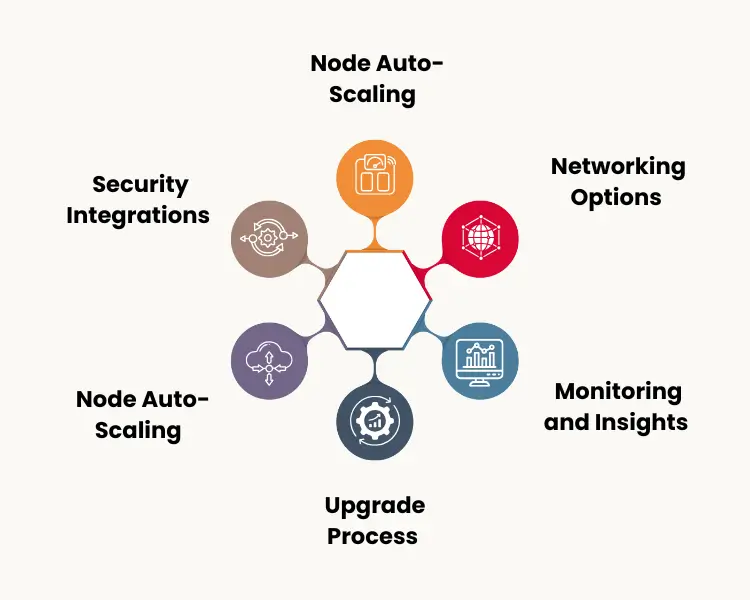
Recent updates to Azure Kubernetes Service have brought a variety of new features and upgrades that revolve around performance, security, automation, and developer productivity.
The new features and upgrades have not only made workload management easier but also more scalable and better connected with the Azure ecosystem.
1. Node Auto-Scaling
Dynamic node scaling reacts to workload demands more powerfully, thus promising that resources will be used to their full potential without the need for manual usage.
2. Security Integrations
The updates bring in the integration of Azure Active Directory, managed identities, and automated patching as the main contributors to the security upgrade.
3. Upgrade Process
Cluster upgrades have been easier to process; thus, there is less downtime, and one is always working with the most recent Kubernetes version.
4. Monitoring and Insights
Integration with Azure Monitor and Container Insights now provides deeper visibility into workloads and resource performance.
5. Networking Options
The support for dual-stack (IPv4/IPv6) networking and upgraded load balancing gives more flexibility for complex deployments.
What are the Options for Scaling Pods and Nodes within AKS?
Scaling in Azure Kubernetes Service (AKS) is used to keep applications working well and being accessible in cases of demand change. Meanwhile, manual and automated scaling options are provided for both pods and nodes, giving firms a chance to alter resources immediately. The focus of pod-level scaling is on the distribution of workloads within a cluster, while node-level scaling is responsible for the infrastructure that underpins those workloads.
With a regulatory AKS cluster management, the platform has two major mechanisms: Horizontal Pod Autoscaler (HPA) and the Cluster Autoscaler (CA). HPA governs the number of pod replicas automatically based on metrics like CPU and memory utilisation, and therefore guarantees smooth applications under different loads. On the other hand, the Cluster Autoscaler is a process that very actively and instantly adds or removes nodes for the cluster depending on the pending workloads.
Furthermore, AKS, being the monitor and metrics server allied with Azure, brings in other capabilities of visibility on the scaling actions taken and the performance of the cluster. This connectivity aids the companies in forming scaling p i policies that are completely dependent on the data collected. This way, AKS provides the management of workflows without any hiccups and caters to both steady-state and burst traffic cases, thanks to its various scaling options and the deepest observability.
What Is The Process Of AKS Working In Relation With CI/CD Pipelines In Azure DevOps?
With the connection of source control, build automation, and deployment pipelines, the developers can get through with the coding and production with little human involvement. This connection lays down the ground for the modern DevOps in terms of delivery practices, version control, and rollback capabilities.
The process of continuous integration runs in the background, where the developers have the facility to automatically create and containerise the applications every time there is a change in the code repository. Later, these container images are sent either to Azure Container Registry or any other compatible registry for storage. Continuous deployment process now takes over and updates the applications in the AKS clusters, thus making sure that the latest version is always available in the specified environments.
AKS, as a mighty Azure container orchestration platform, not only simplifies the CI/CD involvement but also does the heavy lifting of managing the infrastructure required for running scalable applications. Developers can set up their CI/CD using YAML files, Helm charts, or Azure Pipelines for automation. This connection not only speeds up the delivery but also brings cooperation between the development and operations teams, thereby keeping applications secure, and performance based throughout their lifecycle.
What Logging And Diagnostic Tools Are Available For AKS Clusters?
Logging and diagnostics in Azure Kubernetes Service (AKS) are very important to keep the workloads visible, secure, and performing well. With the AKS scaling and monitoring feature, the administrators can make sure that applications are stable and perform well even with changing workloads.
- Azure Monitor– Grants integrated visibility into metrics, logs, and performance data for AKS clusters and associated workloads.
- Container Insights – Gives access to extensive information about the performance of the containers, their resource usage, and the health of the applications.
- Log Analytics Workspace– Merges AKS logs, which allows query-based analysis to be done for troubleshooting and optimisation.
- Diagnostic Settings– Permits setting up data collection for auditing, alerting, and compliance monitoring.
- Azure Advisor Recommendations – Offers automatic insights for the upgrade of the cluster’s reliability, cost-powerfulness, and performance.
Ready For Digital Transformation?
Grow your business with advanced technology and expert digital solutions.
You have a vision. We can help you achieve it.
Bring your vision to life with our expert team. As a global leader, we pave the way in the new era, bringing your ideas to fruition. Partner with us to make your vision a success.
Conclusion
To sum up, Azure Kubernetes Service has turned into a pivotal element for the role of cloud-native application development in modern times, to the extent that it presents a unified platform with its features of scalability, automation, and security. Its integration with Azure DevOps, monitoring tools, and cluster management is are feature that organisations can use to innovate and operate faster and more powerfully.
Revinfotech is a major player in the digital transformation arena by providing a full range of Azure and Kubernetes consulting, deployment, and management services. The company, with its vast knowledge of cloud architecture, automation, and scalability, helps clients make the best use of AKS for hassle-free delivery of containerised applications. Being a technology partner, the company aims to obtain operational excellence and long-term client growth.
Frequently Asked Questions
What is Azure Kubernetes Service used for?
+How does AKS upgrade application scalability?
+Is AKS suitable for production-grade workloads?
+How often does Microsoft release updates for AKS?
+Can AKS integrate with existing DevOps pipelines?
+
Ashwani Kumar
Ashwani Kumar is an SEO Team Lead & Project Manager at RevInfotech with 4+ years of experience in driving sustainable organic growth across competitive digital markets. He specializes in on-page, technical, off-page, and local SEO, focusing on improving ...Read More
Inspired by These Insights? Let’s Talk.
From understanding trends to building solutions, we're here to help you take the next step. Our experts are ready to guide your digital transformation.


